The Mac App Store is not the only place to get Mac apps, and for some kinds of software it is not even the main one. This guide compares six places side by side: what each one is, what it costs, how you install from it, and who it suits. Prices and counts are each service's own figures, checked on 31 October 2026.
The six do different jobs. Two are places you install from, one is a subscription, and three are directories that help you find an app and then send you to its maker.
What does the Mac App Store do well, and what does it miss?
The Mac App Store is Apple's own store, built into every Mac. You search or browse by Discover, Create, Work, Play, Develop and Categories, click Get or the price, and the app installs and updates through the store.
- Price: free to use; each app sets its own price.
- Native Mac app: yes, built into macOS.
- How you install: one click, signed in with your Apple Account.
- Best for: anyone who wants Apple's review and one place for purchases and updates.
Its limit is coverage. Apple requires every Mac App Store app to be sandboxed, so many utilities that need wider access to the Mac ship only from their makers' websites. The store's search never shows them.
What is Setapp?
Setapp is a subscription that bundles curated apps. Its site describes "300+ Mac, iOS, and web apps in one subscription" with a free 7-day trial. You install the Setapp app, then install any app in its catalog from inside it.
- Price: from $14.99 a month plus tax for one Mac; $18.99 for Mac and iOS; $22.99 for four Macs. Each plan includes AI credits.
- Native Mac app: yes, the Setapp app.
- How you install: through the Setapp app, one click per app.
- Best for: people who use several paid utilities and would rather pay one subscription than buy each app.
Setapp's limit is that you only get the apps it has picked, and you keep paying monthly to keep using them.
What is Homebrew?
Homebrew is a free, open-source package manager for command-line tools and apps. Its cask format installs regular Mac apps: brew install --cask followed by the app's name downloads the app from its maker and puts it in Applications.
- Price: free; the project is open source under the BSD 2-clause licence.
- Native Mac app: no, a command-line tool.
- How you install: in Terminal, one command per app, and
brew upgrade --caskupdates them. - Best for: developers and anyone who sets up Macs often and wants a scripted list of apps.
brew search matches package names, so it works best when you already know roughly what the app is called. It shows a one-line description, not screenshots, prices or reviews.
What is MacUpdate?
MacUpdate is a Mac software download website. Its about page says it launched in 1997 and lists more than 32,000 Mac apps and 12,000 developers.
- Price: free to browse; each app sets its own price.
- Native Mac app: no, a website.
- How you install: download from the site or the maker, then install it yourself.
- Best for: finding older or niche software, and previous versions of an app.
With an archive that size, check when an app was last updated before you install it.
What is Indie App Catalog?
Indie App Catalog is a hand-curated catalog of apps from independent developers. Its home page lists 2,508 apps from 1,428 indie developers across Apple platforms, with "no big studios, just solo developers and small teams."
- Price: free to browse.
- Native Mac app: no, a website.
- How you install: it links you to the App Store or the maker.
- Best for: finding indie apps, including iPhone and iPad apps, and betas before launch.
It covers all Apple platforms, so Mac apps share the list with iPhone and iPad apps.
What is Macapp.space?
Macapp.space is a directory of Mac apps aimed at indie makers and small studios. Its catalog is assembled from Homebrew casks, Mac App Store listings, Indie App Catalog and other indie app lists, so App Store apps and direct-download apps sit side by side. On 31 October 2026 its sitemap listed 2,810 apps from 908 developers in 14 categories and 97 topics.
- Price: free to browse.
- Native Mac app: no, a website.
- How you install: each app page links to the App Store or the maker's site.
- Best for: comparing several apps for one job, such as a Mac cleaner, on one page, whether or not they are on the App Store.
Each app page shows the price, macOS minimum, latest version and release notes, and marks apps that run natively on Apple silicon. Topic pages filter by where an app lives (menu bar, notch or Dock) and by open source.
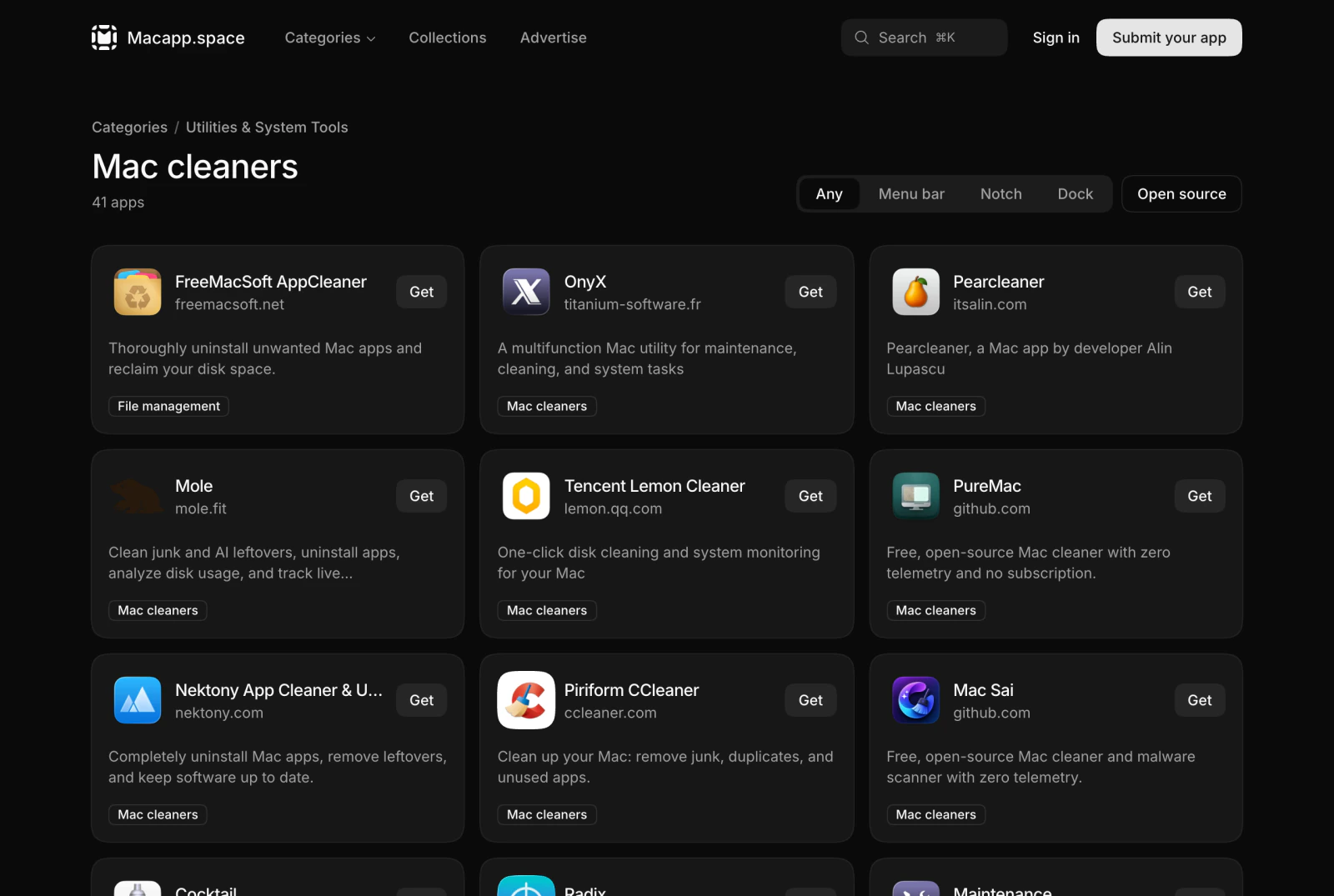
Its limits: it does not install or sell anything, it shows no user ratings or reviews, and its search matches the words you type against app names and descriptions rather than their meaning. It is also much smaller than MacUpdate.
How do the six compare?
| Mac App Store | Setapp | Homebrew | MacUpdate | Indie App Catalog | Macapp.space | |
|---|---|---|---|---|---|---|
| What it is | Apple's store | App subscription | Command-line installer | Download site | Indie app catalog | Mac app directory |
| Cost to use | Free | From $14.99/month | Free | Free | Free | Free |
| Native Mac app | Yes | Yes | No (command line) | No (website) | No (website) | No (website) |
| Installs apps | Yes | Yes | Yes | No | No | No |
| Apps outside the App Store | No | Yes | Yes | Yes | Yes | Yes |
| Platforms | Mac | Mac, iOS, web | macOS, Linux, WSL | Mac | All Apple platforms | Mac |
| Size, own figure | Not published | 300+ apps | Not counted here | 32,000+ apps | 2,508 apps | 2,810 apps |
Which Mac App Store alternative should you use?
Use the Mac App Store when the app you want is there. Use Setapp if you already pay for several utilities it bundles. Use Homebrew if you live in Terminal. Use MacUpdate for a deep archive and older versions, and Indie App Catalog for indie apps across iPhone, iPad and Mac.
Use Macapp.space when you know the job but not the app and want App Store and direct-download apps in one list. Open a topic page for the job, compare price, macOS minimum and last update on each app page, then install from the App Store or the maker's site. Macapp.space also keeps a Not on the Mac App Store list for apps the store never shows.
For an app from outside the App Store, macOS still checks that it is signed by an identified developer and notarized by Apple before it first opens, wherever you found it.
Frequently asked questions
Is there an alternative app store for Mac?
Yes. Setapp is the closest to a second store: you install its app, then install any app in its catalog with one click, paid for by a monthly subscription. Homebrew installs free and paid apps from the command line. Directories such as MacUpdate, Indie App Catalog and Macapp.space help you find apps and send you to the maker to download.
What is a free alternative to Setapp?
None of the options in this guide bundles paid apps for free the way Setapp bundles them for a fee. To find free apps instead, use Homebrew, which costs nothing, or a directory that shows each app's price, such as Macapp.space, whose topic pages also have an Open source filter.
Is it safe to get Mac apps from outside the Mac App Store?
Yes, when the app is signed by an identified developer and notarized by Apple. macOS Gatekeeper checks both before the app first opens, wherever you downloaded it from.
Which option shows apps that aren't on the Mac App Store?
All of them except the Mac App Store itself. Macapp.space also has a dedicated Not on the Mac App Store list of apps sold only from their makers' sites.
Find an agent for the work you need doneBrowse the catalog and see what each package can access before you install it in your Claude workspace.
Browse the catalog