A large share of good Mac software is not on the Mac App Store. Window managers, disk tools, developer utilities and most open-source apps are usually sold or given away from the maker's own website. This guide covers why, how macOS protects you when you install them, and how to find them without visiting a hundred websites.
Why are some Mac apps not on the App Store?
The main reason is the sandbox. Apple's App Review Guidelines say Mac App Store apps "must be appropriately sandboxed," which limits what an app can read and change outside its own container. An app that needs to scan your whole disk, manage other apps' windows or change system settings often can't do its job inside that box.
Cacheless, a disk cleaner, shows the trade-off well. Its catalog page notes two versions: a sandboxed one on the Mac App Store and a direct download that asks for full disk access. Same maker, two builds, because the store version can reach less.
Other makers skip the store for business reasons: they want their own licences, a one-time price, upgrade pricing, or the freedom to ship an update without waiting for review. Open-source apps often have no paid listing at all and publish on GitHub instead.
Is it safe to install Mac apps from outside the App Store?
It is safe when the app passes Gatekeeper's checks, and macOS runs those checks for you. Apple's support page explains that when you open an app from outside the App Store, macOS checks its Developer ID signature to confirm it comes from an identified developer and has not been altered. Since macOS Catalina, the app must also be notarized, which means Apple scanned it for known malware and found none.
The first time you open such an app, your Mac asks if you are sure you want to open it. That prompt is normal. A different warning, one that says macOS can't verify the developer, means the app is not signed or not notarized. Apple's advice in that case is to look for an App Store version or an alternative app rather than override the warning, because overriding security settings is the most common way a Mac gets infected.
How do you install a Mac app that isn't on the App Store?
You install it from the maker's download or with Homebrew. From the maker's site:
- Download the app from the maker's own website, not from a mirror.
- Open the DMG or ZIP file.
- Drag the app into your Applications folder.
- Open the app from Applications and confirm the first-launch prompt.
- Eject the DMG and delete the download.
With Homebrew, one command does the download and the move:
brew install --cask aldente
The cask name is usually the app's name in lowercase with dashes. brew search finds it if you are unsure.
If macOS refuses to open an app you trust, Apple's documented route is System Settings, then Privacy & Security, then Open Anyway. The button is available for about an hour after you tried to open the app, and you confirm with your login password. Use it only when you know who made the app.
How do apps from outside the App Store stay updated?
They update themselves rather than through the App Store. Many use Sparkle, an open-source update framework for macOS apps that reads an update feed the maker publishes. Homebrew can also update every outdated cask you installed with it in one command:
brew upgrade --cask
Macapp.space reads those same Sparkle feeds when it imports apps from Homebrew, and turns them into a release notes page for each app. Before you install, that page tells you whether the app still ships updates or was last touched years ago.
How do you uninstall a Mac app that isn't from the App Store?
Look for the app's own uninstaller first, then drag the app to the Trash. Apple's guide says that if an app includes an "Uninstall" or "Uninstaller" app, often in the same folder, that is the best way to remove it along with its login items, extensions and data stored elsewhere. Some apps put an uninstall or reset option in a menu or in their settings instead.
If there is no uninstaller:
- Quit the app.
- Open Applications in a Finder window.
- Drag the app to the Trash, or select it and choose File, then Move to Trash.
- Enter an administrator password if asked.
- Empty the Trash.
For an app installed with Homebrew, brew uninstall --cask followed by the cask name does the same. Uninstalling does not cancel a subscription you bought through the app, so cancel that with the maker separately.
Where can you find Mac apps that aren't on the App Store?
You can find them on makers' websites, in Homebrew's cask list, and in directories that collect them. The App Store's own search never shows them, which is why they are hard to discover.
Macapp.space has a Not on the Mac App Store list for exactly this. An app lands there when its catalog record marks it as a direct download, or when it has no distribution recorded and no App Store ID. Apps recorded as sold both ways stay off the list, so it is mostly apps the App Store would not have shown you. It is sorted by name, with apps such as 0 A.D., 010 Editor and 1Password near the top.
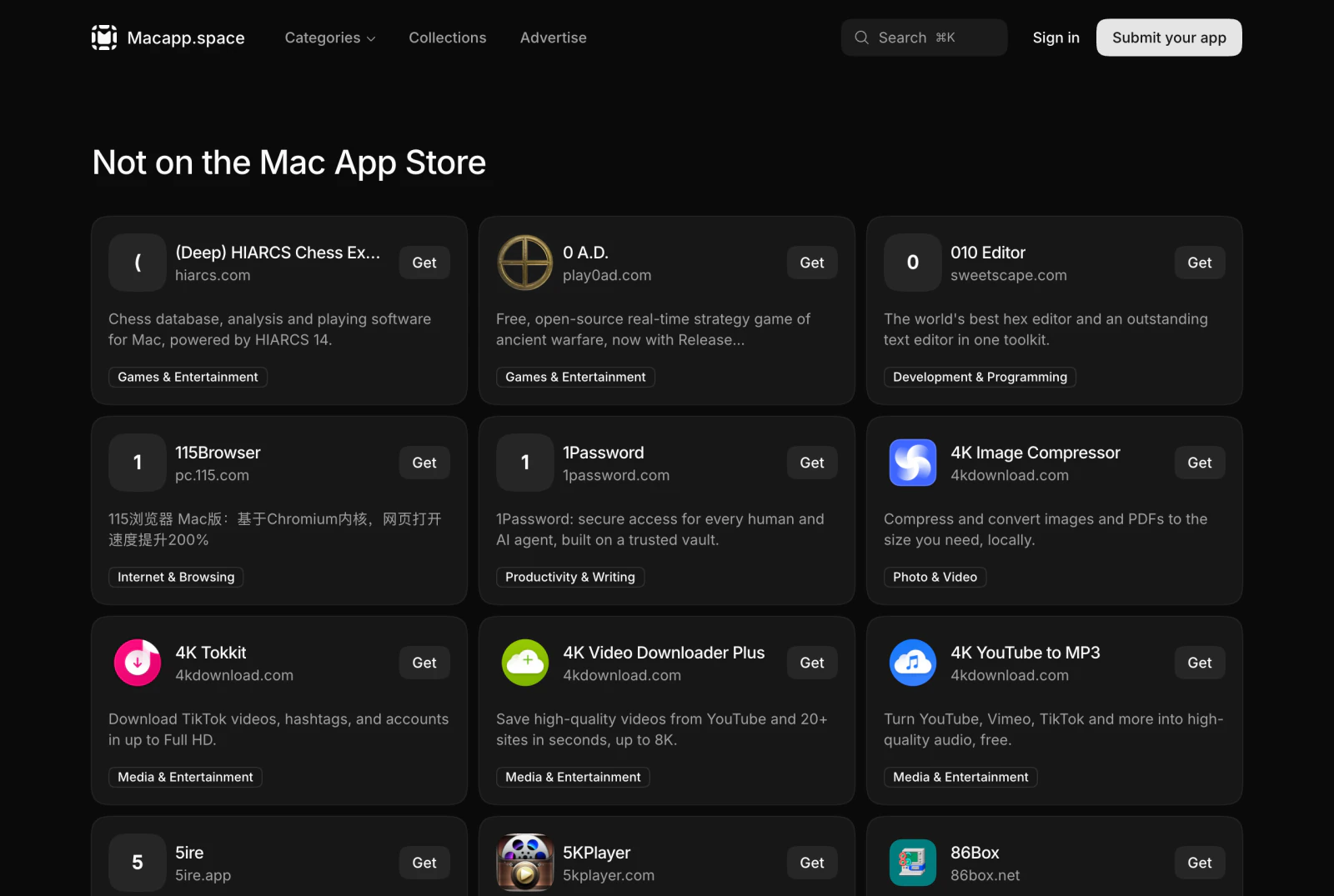
The list is sorted alphabetically and has no filters of its own. When you are looking for a job rather than browsing, a topic page such as Mac cleaners is faster: it mixes App Store and direct-download apps and lets you narrow by Menu bar, Notch, Dock or Open source.
What should you check before you download one?
Check the price, the macOS minimum, Apple silicon support and the last update. Macapp.space shows Price, Requires and Version lines on each app page, adds an Apple silicon: Native line when the app runs natively, and links to the release notes. Then follow the app's Get link to the maker's own site, so the file you download comes from the developer and passes Gatekeeper's signature check.
What is the quickest way to find Mac apps outside the App Store?
Use Homebrew if you know the app's name and like Terminal. If you are browsing, open the Macapp.space Not on the Mac App Store list, or a topic page for the job you need. Each app page gives you the price, macOS minimum and update history before you click through to the maker's site, which saves opening a dozen tabs to compare apps the App Store can't show you.
Frequently asked questions
Why are some Mac apps not on the App Store?
Apple's App Review Guidelines require Mac App Store apps to be sandboxed. Apps that need wider access, such as cleaners that read the whole disk or tools that change system behaviour, often ship only from their makers' sites. Some makers also prefer their own pricing, licences or update schedule.
Is it safe to download Mac apps from outside the App Store?
It is safe when the app is signed by an identified developer and notarized by Apple, which Gatekeeper checks before the app first opens. Notarization means Apple scanned the app for known malware and found none. Apple warns against overriding Gatekeeper for an app it has not checked.
How do I open a Mac app that is not from the App Store?
Open it from Applications; the first time, macOS asks if you are sure. If macOS blocks it, go to System Settings, Privacy & Security, and click Open Anyway, which is available for about an hour after you tried to open the app. Do this only for an app whose maker you trust.
How do Mac apps from outside the App Store update?
They update themselves rather than through the App Store, many through the open-source Sparkle framework. Homebrew can also update every outdated cask you installed with it by running `brew upgrade --cask`.
Find an agent for the work you need doneBrowse the catalog and see what each package can access before you install it in your Claude workspace.
Browse the catalog